
T20fun Login
Sign in with your mobile number
100% Secure Connection · Fast login
- Login Method
- Mobile number+Otp
- Password required?
- Usually No as Otp option is available
- App available
- Android APK Available
- iOS Login
- Use mobile browser
How to Login?
- 1
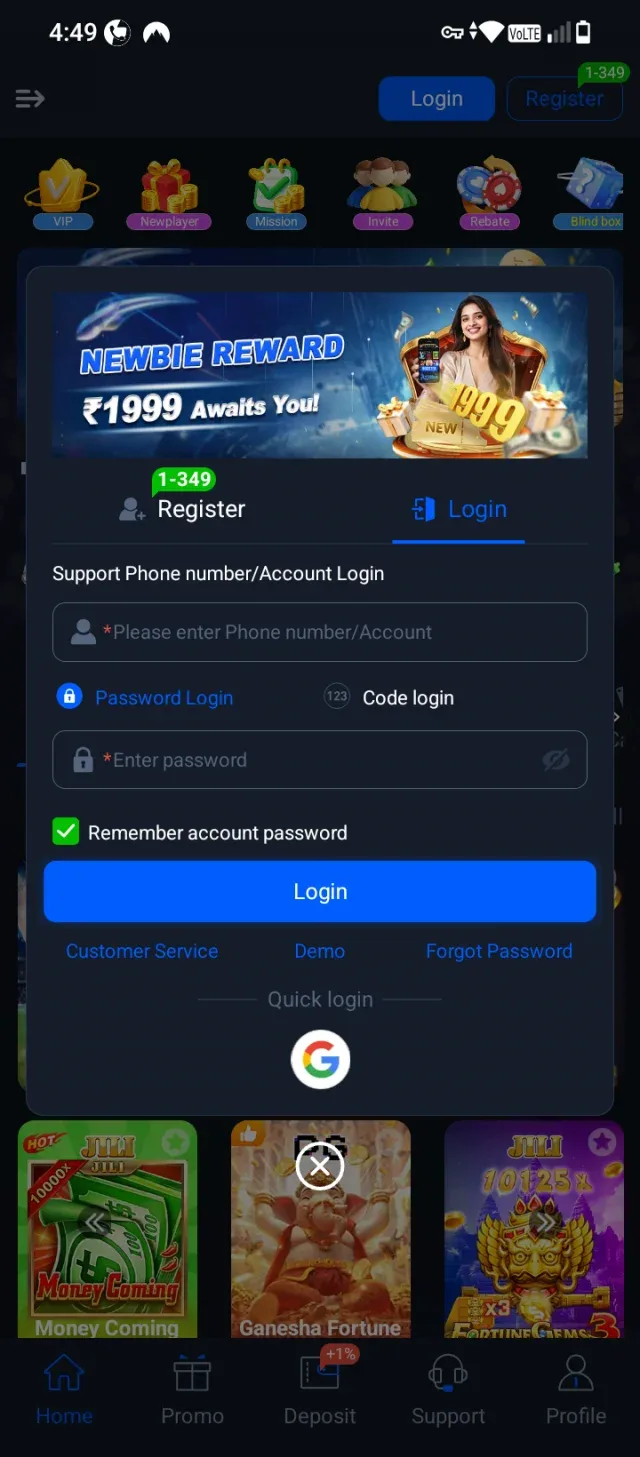
Open the Login Screen
Tap on the Login tab or button at the top of the app interface. </br>Ensure the Login tab is selected (indicated by the blue highlight/underline). </br>In the Phone number/Account box, type your registered phone number or account ID. </br>Select Password Login and enter your password in the box below. </br>(Optional) Keep Remember account password checked if you want the app to save your credentials for faster access next time. </br>Tap the blue Login button at the bottom to complete signing in.
- 2
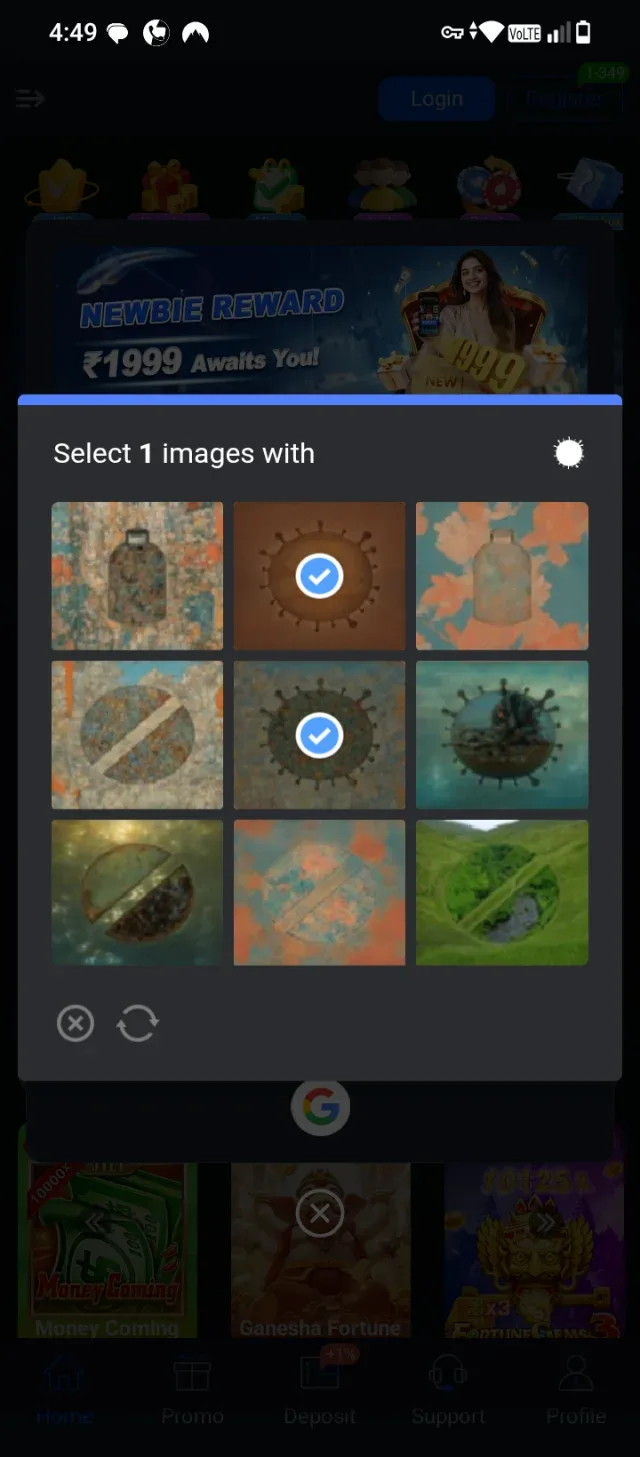
Complete the Image Verification (CAPTCHA)
Look at the prompt instruction at the top of the pop-up window to see what item or icon you need to select. </br>Check the reference icon displayed in the top-right corner of the pop-up box to identify the target object. </br>Tap on all the grid images that match the target object. Selected images will display a blue checkmark. </br>Once you have selected the matching images, the system will automatically verify your request and proceed to log you into your account.
- 3
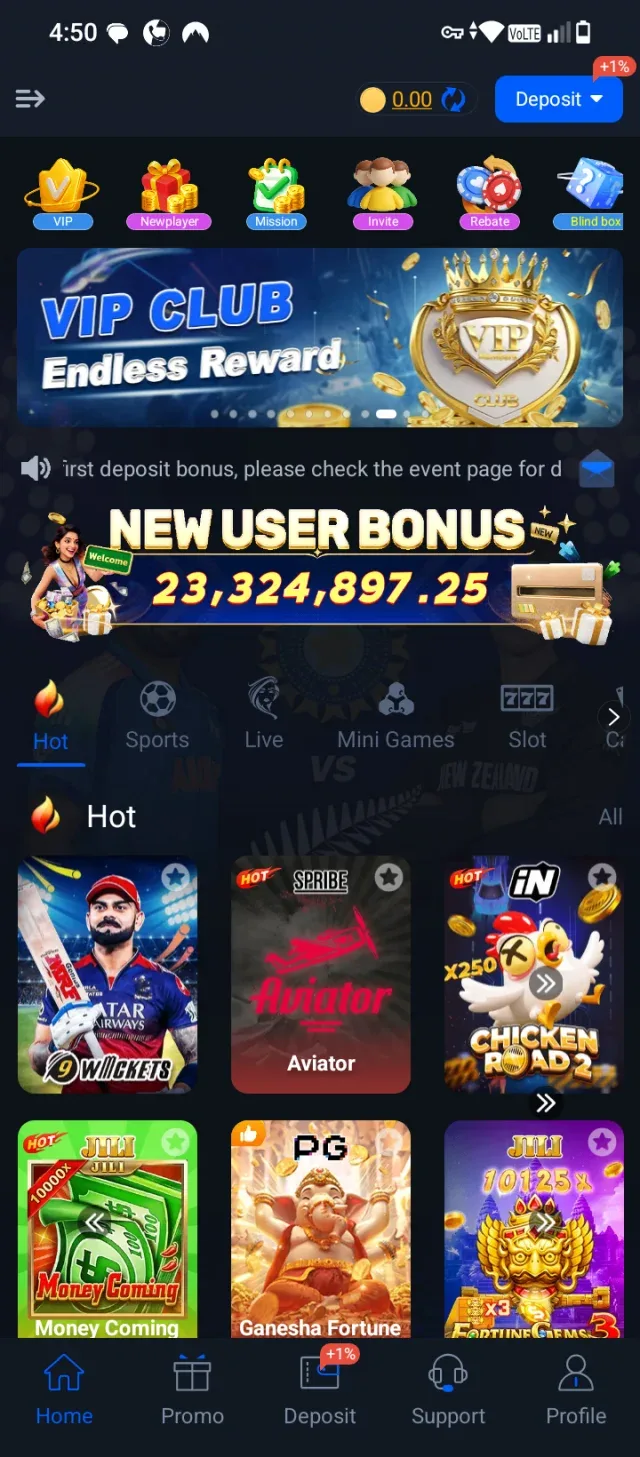
Access the Home Dashboard & Explore Games
Once verification is complete, you will be redirected to the main Home screen of your account. </br>Check the top-right corner to view your available account balance and access the Deposit button. </br>Explore special promotions, rewards, and events using the quick-access icons (such as VIP, New player, and Mission) located near the top banner. </br>Browse the game categories (Hot, Sports, Live, Mini Games, Slot) to find a game you want to play. </br>Tap on any game card (e.g., Aviator, 9 Wickets, or Money Coming) to launch and start playing!
- 4
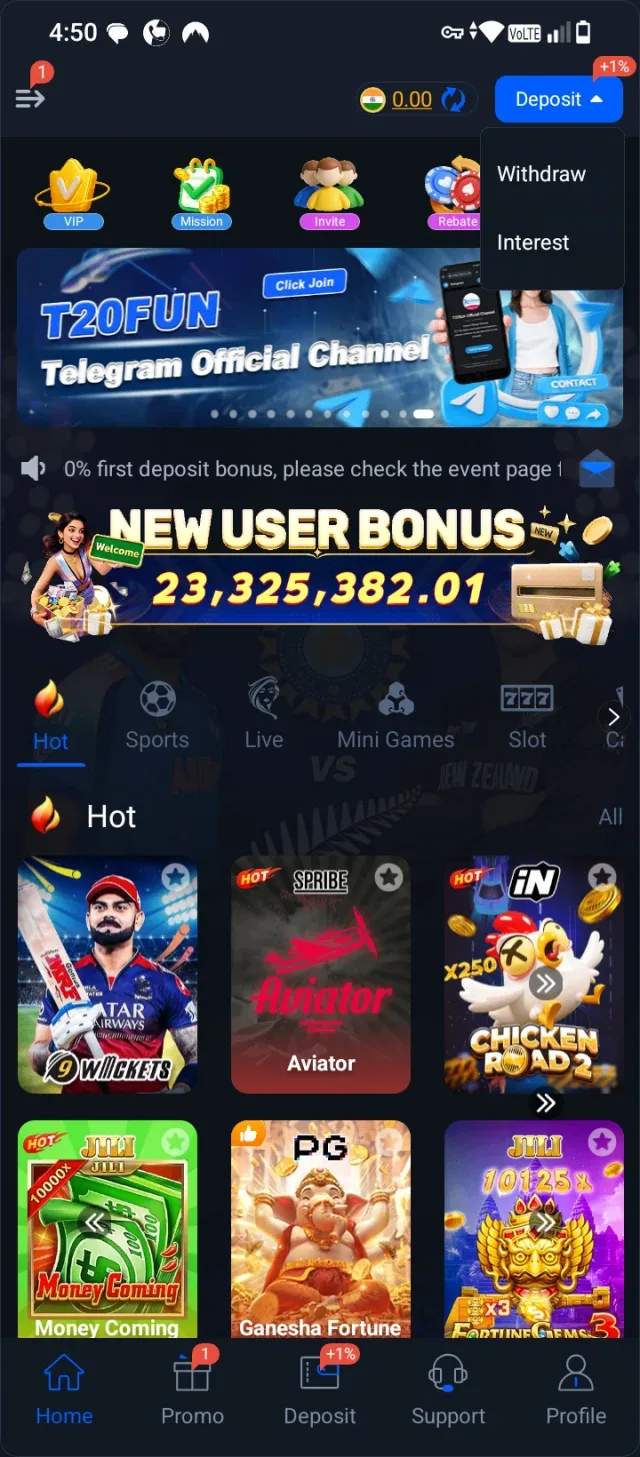
Open Wallet & Deposit Menu
On the main dashboard, locate the blue Deposit button in the top-right corner of the screen. </br>Tap on the small arrow next to Deposit to reveal the drop-down menu options: </br>Deposit: Tap here to add funds to your account balance using available payment methods. </br>Withdraw: Tap here when you are ready to cash out your winnings to your linked bank account or wallet. </br>Interest: Tap here to view earned bonuses or interest returns on your balance.
- 5
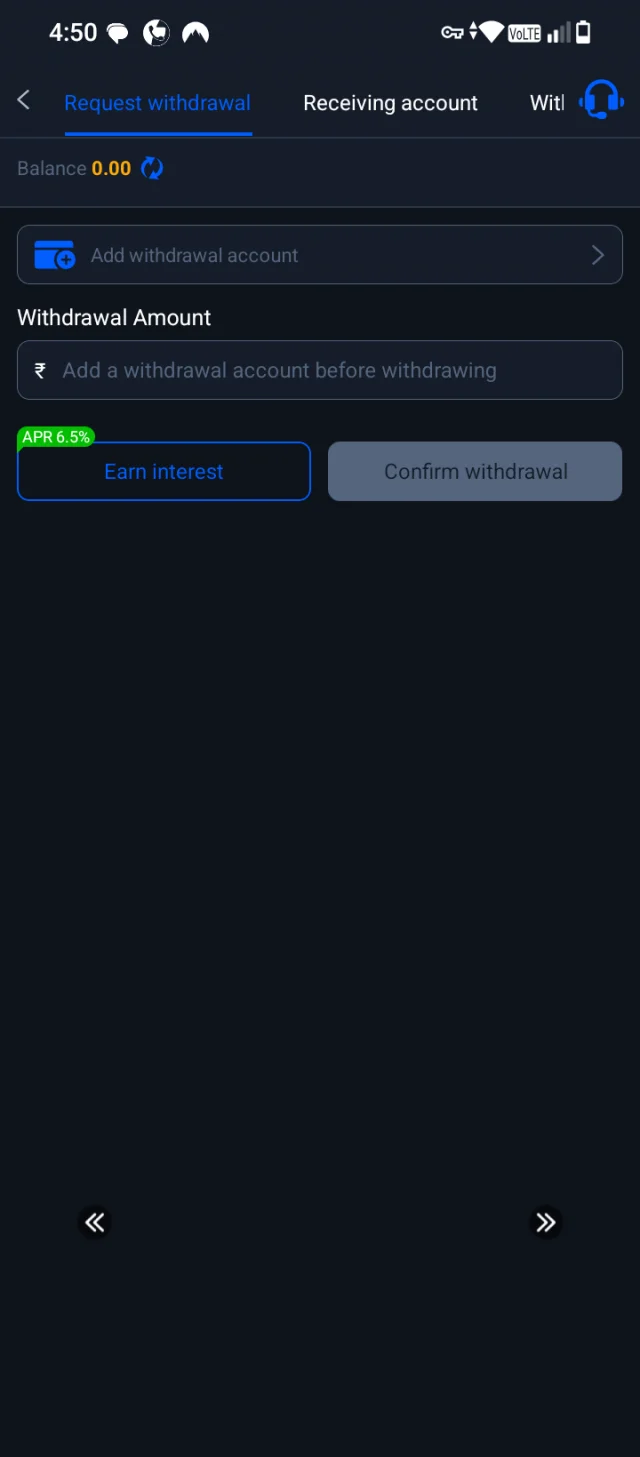
Request a Withdrawal
View your current Balance at the top of the screen (showing \text{₹}0.00 in this view). </br>Tap on Add withdrawal account to link your bank account or payment destination before attempting a withdrawal. </br>Once linked, enter your desired Withdrawal Amount in the designated input field. </br>Tap the Earn interest button (highlighted with an APR 6.5% tag) if you want to put your funds toward earning interest. </br>Finally, tap Confirm withdrawal to submit your cash-out request.
- 6
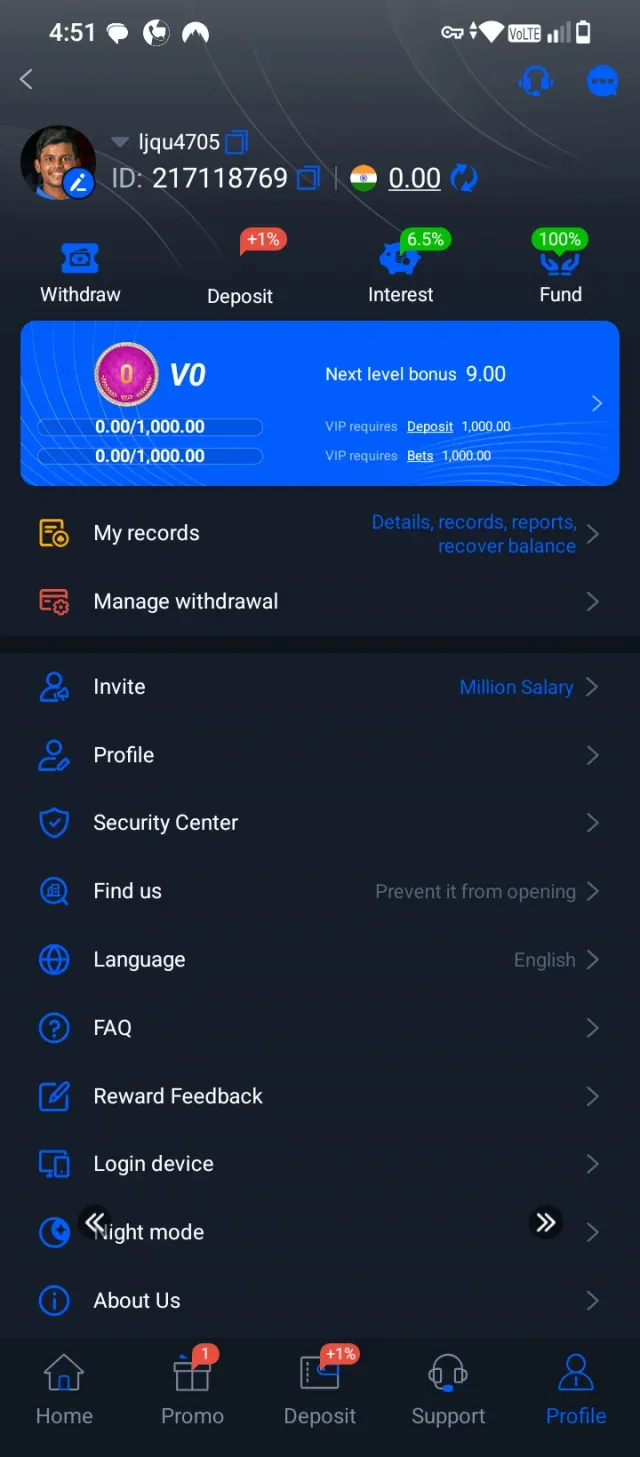
View Profile & Account Settings
View your account profile overview, including your avatar, username (ljqu4705), ID (217118769), and current balance (\text{₹}0.00) at the top. </br>Track your membership status (currently V0) and progress toward the next level bonus, which requires specific deposit and bet milestones. </br>Tap on quick-action buttons below your balance to Withdraw, Deposit, check Interest, or access Fund options. </br>Manage your history and settings using the list options:</br>My records: View your transaction and activity history. </br>Manage withdrawal: Configure and update your linked withdrawal accounts. </br>Invite: Access referral links and programs like "Million Salary". </br>Security Center: Update passwords or enhance account security. </br>Language: Change app language preferences (currently set to English). </br>FAQ, Reward Feedback, Login device, Night mode, and About Us: Adjust app settings, view troubleshooting info, or reach out for assistance.
- 7
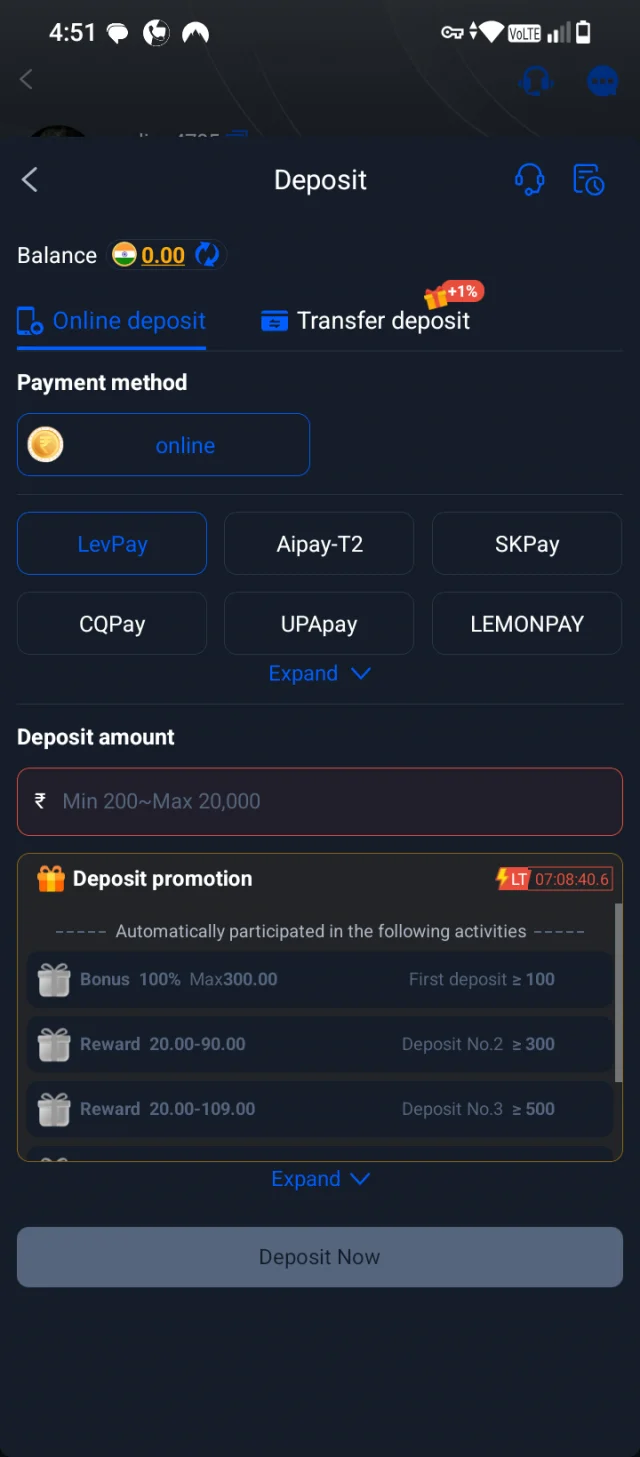
Making an Online Deposit
View your current account balance displayed at the top of the deposit screen. </br>Choose between Online deposit and Transfer deposit options, where transfer deposit includes a +1% bonus tag. </br>Select your preferred Payment method from the available gateways like LevPay, Aipay-T2, SKPay, CQPay, UPAPay, LEMONPAY, or tap Expand to see more options. </br>Enter your desired Deposit amount within the specified range of Min 200 to Max 20,000. </br>Review the Deposit promotion section, which automatically participates you in promotional activities such as a 100% bonus for a first deposit of \ge 100 and rewards for subsequent deposits. </br>Tap the Deposit Now button at the bottom to proceed with adding funds.
- 8
Disclaimer
The information, steps, and walkthroughs provided in this guide are for informational and educational purposes only.</br>Interacting with online gaming, betting, or financial transaction platforms involves inherent financial risks. Please ensure you comply with all local laws and regulations applicable in your jurisdiction before participating or depositing funds.</br>Always exercise caution, gamble responsibly, and never invest money you cannot afford to lose.
[Screenshot: Disclaimer]
Common Questions
How do I log in to my account?
You can sign in by entering your registered phone number or account ID and password, or by using alternative methods like code login or quick login.